

Machine learning involves creating models from data, requiring computers to understand that data. Various data representation methods must be considered for effective comprehension.
Data as Table
In the Scikit-Learn library, data is best represented in tables, where rows denote individual elements and columns indicate quantities related to those elements in a 2-D grid. The following example displays the iris dataset as Pandas DataFrame using the seaborn library.
import seaborn as sns

iris = sns.load_dataset('iris')
print(iris)
Output
     sepal_length  sepal_width  petal_length  petal_width    species
0             5.1          3.5           1.4          0.2     setosa
1             4.9          3.0           1.4          0.2     setosa
2             4.7          3.2           1.3          0.2     setosa
3             4.6          3.1           1.5          0.2     setosa
4             5.0          3.6           1.4          0.2     setosa
..            ...          ...           ...          ...        ...
145           6.7          3.0           5.2          2.3  virginica
146           6.3          2.5           5.0          1.9  virginica
147           6.5          3.0           5.2          2.0  virginica
148           6.2          3.4           5.4          2.3  virginica
149           5.9          3.0           5.1          1.8  virginica

[150 rows x 5 columns]
The seaborn library can be installed with the following command.
pip install seabornData as Feature Matrix
Features matrix is a 2-D table layout stored in a variable, shaped [n_samples, n_features]. Typically, it is in a NumPy array or Pandas DataFrame. Samples represent individual objects, while features provide distinct quantitative observations for each sample.
Data as Target Array
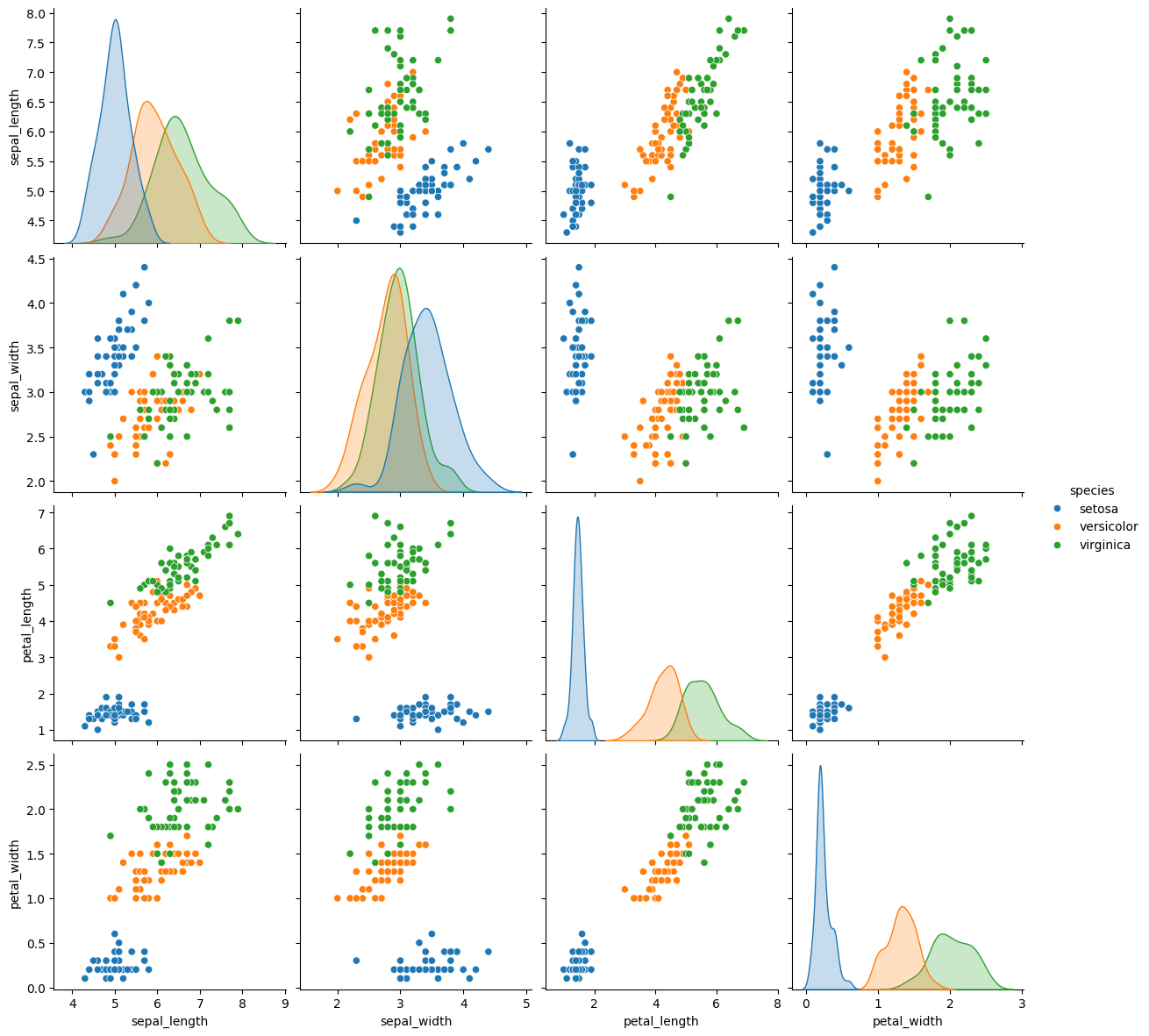
The target array, or label, is a one-dimensional array with length n_samples, containing both continuous numerical and discrete values. In the following example, the species of flower are predicted from the iris dataset. That is, the “Species” column is supposed as the feature.
import seaborn as sns

iris = sns.load_dataset('iris')
sns.pairplot(iris, hue='species', height=3).savefig("target_array_plot.png")
Output
import seaborn as sns

iris = sns.load_dataset('iris')

data_iris = iris.drop('species', axis=1)
print(data_iris.shape)
target_iris = iris['species']
print(target_iris.shape)
Output
(150, 4)
(150,)
References
- Hackeling, G. (2017). Mastering Machine Learning with scikit-learn, 2nd Edition. Packt Publishing Ltd.
- Géron, A. (2019). Hands-On Machine Learning with Scikit-Learn, Keras, and TensorFlow, 2nd Edition. O’Reilly Media, Inc.
- Tutorials Point. Scikit Learn Tutorial. Retrieved November 20, 2025, from https://www.tutorialspoint.com/.

Leave a Reply